
Table of Contents
- Why Mahjong Invitations Need the Right Card Stock
- Understanding Paper Weight: What Pound Weight Actually Means
- 90 lb vs. 110 lb Cardstock: Which Wins for Invitations?
- Matte vs. Glossy Cardstock: Choosing a Finish for Readable Tiles and Text
- Invitation Paper Size: 4x6, 5x7, or 11x17 Sheets
- Printing Invitations at Home: Printer Limits and Test Prints
- Cutting, Envelopes, and Mailing Your Mahjong Invitations
- Conclusion: Matching Card Stock to Your Mahjong Event
- Frequently Asked Questions
Last Updated: October 19, 2026
Why Mahjong Invitations Need the Right Card Stock
Here is the honest answer. Mahjong invitations carry dense artwork. Tiles, dragons, flowers, and suit symbols crowd the page. Thin paper buckles under heavy ink.
So paper choice is not a small detail. It decides whether your invitation looks like a keepsake or a handout.
Below, we break down paper weight, finish, size, and printer limits so you can pick right the first time.
Understanding Paper Weight: What Pound Weight Actually Means
Paper weight is the weight in pounds of 500 sheets of that paper at its standard size. Higher numbers mean thicker, stiffer sheets.
That is the whole idea. But the number confuses people because different paper types use different base sizes. A 65 lb cover stock is not the same thickness as 65 lb text paper. The pound figure only means something when you know which base size it was measured against.
Cover Weight vs. Text Weight
Cover stock is stiff paper built for covers, postcards, and business cards. It stands up on its own.
Text paper is lighter and flexible. It suits letterhead and inside pages.
For mahjong invitations, you want cover weight. Text paper flops in the hand and dents in the envelope.
The Number That Actually Predicts Printer Performance: Caliper and GSM
Pound weight tells you how heavy a ream is. It does not tell you how thick a single sheet is, and thickness is what jams a printer. Two numbers do that job better:
- Caliper is thickness measured in thousandths of an inch (points). A sheet around 10 to 12 points behaves like typical 110 lb cover stock; a sheet around 8 to 9 points behaves like 80 to 90 lb cover.
- GSM (grams per square meter) is the metric weight. As a rough guide, 65 lb cover is near 176 GSM, 80 lb cover is near 216 GSM, 100 lb cover is near 270 GSM, and 110 lb cover is near 300 GSM. Converters vary by mill, so treat these as ranges, not exact equivalents.
Why this matters for mahjong invitations: your design is ink-heavy. Dense tile, dragon, and flower artwork lays down a lot of coverage, and a thicker sheet resists the curl that heavy ink causes. When you shop, look for the caliper or GSM on the spec sheet, not just the pound label. If a listing gives only pounds, check the paper type (cover vs. text) before you compare it to anything else.
What Weight Means for a Mahjong Invitation Specifically
A mahjong invitation is a small card carrying a busy, colorful motif. That combination pushes you toward the heavier end of cover stock for three reasons:
- Ink load. Full-color tile graphics cover most of the sheet. A thicker sheet absorbs that ink without buckling at the edges.
- Hand feel. Guests handle an invitation for a few seconds and judge it by stiffness. A firm sheet reads as a real event; a floppy one reads as a flyer.
- Mail survival. A stiffer card resists bending in sorting equipment and arrives flat.
The trade-off is printer compatibility. The heavier the sheet, the more likely a home printer is to misfeed it. The next sections cover how to match weight to your printer and how to test before you commit to a full batch.
90 lb vs. 110 lb Cardstock: Which Wins for Invitations?
For most mahjong invitations, 110 lb cardstock wins. It feels substantial, resists bending, and prints cleanly on most home printers.
Here is how the two compare:
| Factor | 90 lb Cardstock | 110 lb Cardstock |
|---|---|---|
| Feel in hand | Light but decent | Firm and premium |
| Home printer feed | Very reliable | Reliable on most models |
| Ink handling | Good | Better, less curl |
| Mailing cost | Standard postage | Standard postage |
| Best for | Budget mailings, big guest lists | Keepsake invitations, small events |
90 lb pros: feeds easily, costs less, and folds without cracking. 90 lb cons: feels thin next to premium cards and can warp under heavy ink coverage.
110 lb pros: holds rich color, stands firm in the envelope, and feels like a store-bought invitation. 110 lb cons: some budget printers jam on it, and it needs a slightly slower print setting.
Matte vs. Glossy Cardstock: Choosing a Finish for Readable Tiles and Text
Matte cardstock is the better finish for mahjong invitations. It absorbs ink evenly, keeps small text sharp, and never throws glare across your tile artwork.
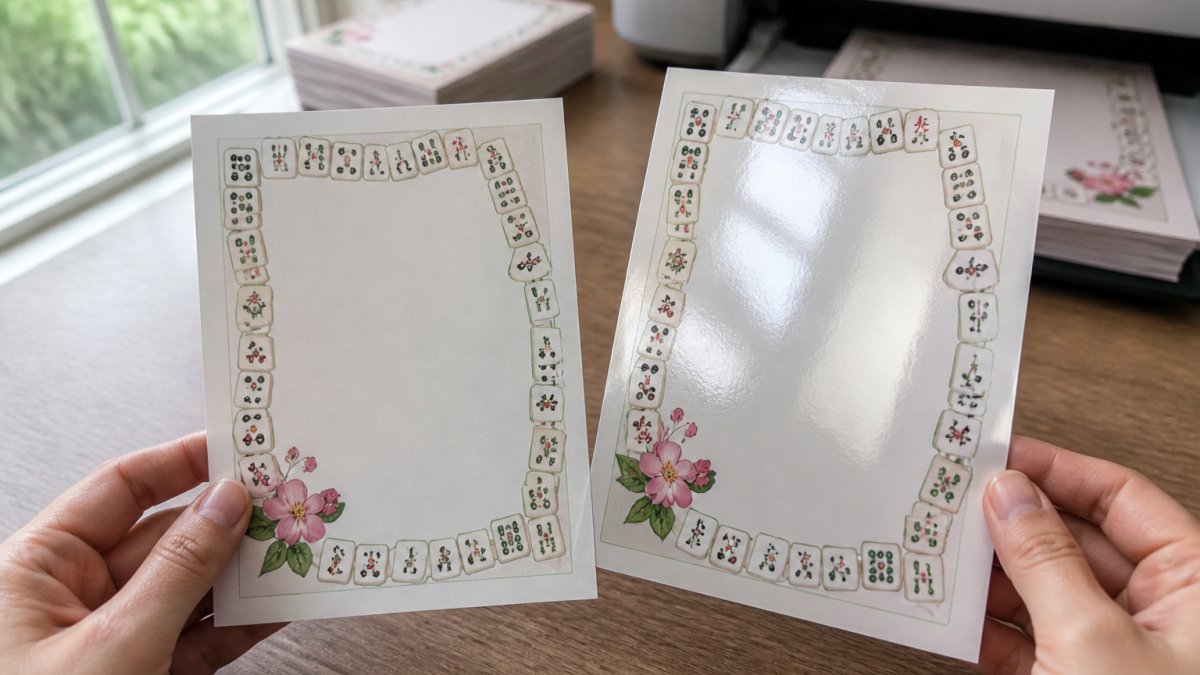
Glossy stock looks shiny, but it fights you in two ways. Light bounces off the surface, so guests tilt the card to read the details.
Matte finishes come in a few textures:
- Smooth matte: clean and modern, best for crisp tile graphics
- Linen: subtle woven texture, elegant for formal club events
- Felt: soft and heavy, lovely but harder to print at home
Match the finish to the artwork. Bold retro tile designs pop on smooth matte. Delicate floral borders suit linen.
Funny Mahjong Retro Physical Birthday Card →
Invitation Paper Size: 4x6, 5x7, or 11x17 Sheets
A 5x7 invitation is the safest choice for mahjong events. It fits standard A7 envelopes, mails at the standard letter rate, and gives your tile artwork room to breathe.
Here is how the sizes stack up:
- 4x6: postcard size, cheapest to mail, but tight for dense tile designs
- 5x7: the classic invitation size, easy to find envelopes for
- 8.5x11: letter sheets you trim down yourself, best for bulk printing
Do the math before you buy. One 11x17 sheet cuts into four 5x7 invitations. That means fewer passes through the printer and less waste per card.
Printing Invitations at Home: Printer Limits and Test Prints
Most home inkjet printers handle cardstock up to 110 lb, but only through the rear feed tray. Check your printer's manual before you buy paper in bulk. This is the step most hosts skip, and it is the step that decides whether a full pack of paper becomes invitations or scrap.
Check Your Printer's Specs Before You Buy Paper
Before you order cardstock, find three numbers in your printer's documentation or the manufacturer's spec page:
- Maximum media weight. Look for a figure in lb or GSM for the rear or manual feed. Many consumer inkjets top out around 110 lb cover (roughly 300 GSM); some budget models stop lower.
- Supported media types. Confirm the printer lists cardstock or thick paper as a supported type. If it only lists plain paper and photo paper, thick stock may misfeed.
- Feed path. Rear or manual feed usually takes a straighter path, which handles stiff sheets better than a front cassette that bends the paper around rollers.
A common mistake is loading thick stock into the front cassette. The printer grabs two sheets at once, jams, and smears ink. Use the rear feed and load one sheet at a time if your model struggles.
A Test-Print Workflow That Catches Problems Early
Run a test print before you commit to a batch. This sequence saves money and frustration:
- Print one invitation on plain paper first to check layout, margins, and that nothing important falls outside the trim line.
- Print the same file on a single sheet of your cardstock using the rear feed.
- Check color brightness, smudging, and edge curl while the sheet is still in the output tray.
- Change the paper type setting to "cardstock" or "thick paper" and reprint one sheet to compare.
- Let the test sheet dry for ten minutes, then rub a corner gently to see whether ink transfers.
- Fold or score a scrap of the same stock to confirm the coating does not crack along the crease.
If the first cardstock test smears, do not assume the paper is bad. Work through the likely causes in order.
Troubleshooting the Common Failures
- Smudging or wet ink. The printer is laying down too much ink for the coating. Switch the paper type to matte cardstock, lower the ink density if your driver allows it, and give each sheet more drying time before stacking.
- Edge curl. Heavy ink coverage on a thin sheet causes this. Step up one weight, or reduce the ink coverage in the design by leaving a small unprinted border.
- Misfeeds and double-pulls. Load one sheet at a time in the rear feed, fan the stack before loading, and make sure the paper is flat and dry. Humid paper feeds poorly.
Inkjet printers generally handle matte cardstock better than laser printers, which run hot and can crack the coating. If you own a laser printer, choose a smooth matte stock rated for laser use.
Cutting, Envelopes, and Mailing Your Mahjong Invitations
Cut invitations with a paper trimmer, not scissors.
Score the fold line before folding. Scoring compresses the paper along the crease so the fold stays crisp and the ink does not crack.
For envelopes, match your card size. A 5x7 invitation needs an A7 envelope. A 4x6 card fits an A6 envelope.
Before you mail, weigh one finished invitation with its envelope at the post office.
Conclusion: Matching Card Stock to Your Mahjong Event
Choosing paper is the step most hosts rush, and it shows in the final card. A 110 lb matte cover stock handles tile artwork, feels substantial, and mails without drama.
Get the paper right, then let the design do the rest. If you would rather skip the printer entirely, our Mahjong Birthday Card for Women arrives professionally printed on quality card stock with a white envelope included, and our Happy Birthday Mahjong Card brings the same tile-and-floral charm to a 5x7 folded card.


For invitations, printable templates from AmericaMahjongfun.com give you festive, retro-inspired designs you can print at home the same day. Pick your stock, run a test sheet, and send your club an invitation worth keeping.
Frequently Asked Questions
Is 90 lb or 110 lb cardstock thicker for mahjong invitations?
110 lb cardstock is thicker and stiffer than 90 lb, which gives invitations a more substantial feel and helps them survive mailing without bending. That extra stiffness matters more for 5x7 cards than for 4x6 cards, which stay rigid even at 90 lb. The trade-off is printer compatibility: many home inkjet printers list 90 lb as their comfortable maximum, so check your printer's manual before committing to 110 lb for a full print run.
Should mahjong invitations be 4x6 or 5x7 inches?
Both work, and the choice comes down to how much design you want on the card. A 5x7 invitation gives you room for a mahjong tile motif, event details, and a decorative border without crowding, and it fits a standard A7 envelope. A 4x6 is cheaper to mail, easier to trim from a letter-size sheet, and still readable. For club events with lots of details like date, location, and a bring-a-friend note, 5x7 is the safer pick.
Is matte or glossy cardstock better for printed mahjong invitations?
Matte cardstock is the better default for invitations. It absorbs ink well, resists smudging, and keeps small text and fine tile artwork readable under any lighting. Glossy cardstock makes colors pop, but it reflects light and can make thin fonts harder to read, and it shows fingerprints. If you want shine, use glossy for a photo panel or accent and keep the text areas matte.
Can a home printer handle heavy cardstock for invitation printing?
Many home inkjet and laser printers can handle cardstock up to around 90 lb to 110 lb, but the exact limit is in your printer's manual, not on the paper package. Before printing a full batch, run one test sheet through the rear or manual feed tray and check for jams, smearing, and color accuracy. If your printer struggles, drop to 80 lb to 90 lb cardstock or send the file to a print shop.