
Table of Contents
- What You'll Need Before You Print
- How to Download and Open Your Digital Mahjong Card Files
- Printer Settings for Printing Digital Mahjong Cards
- Best Paper for Printing Game Cards
- How to Print Double-Sided Mahjong Cards and Score Sheets
- How to Laminate Printable Mahjong Cards
- Where to Find Printable Mahjong Score Sheets Free
- Common Printing Mistakes to Avoid
- A Quick Reference for Your Next Print Job
- Frequently Asked Questions
Last Updated: September 23, 2026
What You'll Need Before You Print
When you print digital mahjong cards at home, the job starts with a short supply list. Gather these first and the rest takes minutes.
Here's what you need:
- A computer or tablet with a PDF reader
- Your downloaded digital card file
- A printer with ink or toner
- Cardstock, 65 lb to 110 lb
- A paper trimmer or sharp scissors
- A scoring card for reference
How to Download and Open Your Digital Mahjong Card Files
Digital mahjong files arrive as instant downloads, usually within seconds. Most are PDFs; some sellers include JPG versions too.
Follow these steps:
- Check your email for the download link
- Save the file to a folder you'll remember
- Open the file in a free PDF reader
- Zoom in to check the layout and alignment
Checking File Format and Resolution
A print-ready file should be 300 DPI (dots per inch) or higher, which controls how sharp your card looks. Files below 300 DPI look blurry or pixelated, so check file properties before printing.
- PDF: best for printing, keeps layout locked
- JPG: fine for most home printers
- PNG: works well for cards with graphics
Printer Settings for Printing Digital Mahjong Cards
Most print problems with digital mahjong cards come from three settings: scale, paper type, and color handling. Get those right and the rest is automatic.
Set these before you hit print:
- Paper size: Letter (8.5 x 11 inches)
- Orientation: Portrait for cards, landscape for wide score sheets
- Scale: 100%, never "fit to page"
- Quality: Best or High
- Margins: Default or minimum
- Color: RGB source files print fine on home printers; leave color management on "printer manages color" unless your file ships with a CMYK profile
File Specs That Decide Print Quality
Before touching a printer setting, check the file. Three specs control whether your card looks crisp or muddy:
- DPI (dots per inch): 300 DPI is the print standard. Files below 300 DPI look soft or pixelated at full size. Files at 600 DPI are fine but unnecessary for home printing.
- Bleed: A print-ready card file usually includes 1/8 inch of bleed beyond the trim line so color runs to the edge after cutting. If your file has no bleed, leave a thin white border when you trim instead of cutting into the design.
- Color space: RGB is correct for home inkjet and laser printers. CMYK files are built for commercial presses and often print dull or shifted on a desktop printer. If a seller offers both, pick RGB for home use.
Inkjet Printer Walkthrough
Inkjet printers produce the richest color for illustrated mahjong cards but smudge if you rush the paper handling.
- Open the print dialog and select your printer.
- Set Paper Size to Letter and Scale to 100%.
- Open Printer Properties (Windows) or Printer Features (Mac).
- Set Media Type to "Matte Photo Paper" or "Cardstock", not "Plain Paper."
- Set Print Quality to "High" or "Best."
- If your printer has a rear feed tray, use it for cardstock. The straight paper path reduces jams and roller marks.
- Print one test page on plain paper first, then load cardstock.
Laser Printer Walkthrough
Laser printers run faster and produce smudge-resistant output because toner is fused with heat. The trade-off: heavy cardstock needs a straight paper path and the right media setting, or the fuser won't bond the toner.
- Select your laser printer in the print dialog.
- Set Paper Size to Letter and Scale to 100%.
- Open Printer Properties and set Paper Type to "Cardstock," "Heavy Paper," or "Labels", whichever your driver offers for thick stock.
- Set Print Quality to the highest available setting (often labeled "Fine" or "1200 dpi").
- Load cardstock in the multipurpose or manual feed tray, not the main cassette.
- Print a single test sheet and check that toner doesn't flake off when you rub it.
When to Adjust Color Settings
If your printed card looks washed out or too dark versus your screen, the fix is usually one of two things:
- Turn off "Economy" or "Draft" mode, it reduces ink or toner density.
- In the print dialog, choose "Printer Manages Color" rather than an ICC profile meant for a different paper.
Best Paper for Printing Game Cards
Cardstock is the right choice when you print digital mahjong cards and score sheets. Standard 20 lb copy paper is too thin: ink shows through, the card bends at the fold, and laminated sheets feel flimsy.
- 65 lb cardstock: Light and flexible. Good for score sheets and cards you'll laminate, because it feeds through most printers without jamming.
- 80 lb cardstock: The sweet spot. Sturdy enough to feel like a real card, thin enough for most home inkjet and laser printers to handle in the main tray.
- 110 lb cardstock: Heavy and rigid. Best for score sheets and reference cards that sit flat on the table. Many home printers require the rear or manual feed tray for this weight.
Matching Paper to Your Printer
Not every cardstock works in every printer. The wrong combination causes jams, roller marks, or flaking toner.
- Inkjet printers: Choose matte cardstock labeled "inkjet compatible." Matte finishes absorb ink cleanly and resist smudging. Glossy cardstock looks richer but smudges easily on inkjet printers and often needs extra drying time.
- Laser printers: Choose cardstock labeled "laser compatible" or "laser and inkjet." Laser-compatible stock is formulated to survive the fuser's heat without curling or scorching. Never run inkjet-only coated paper through a laser printer, the coating can melt and damage the fuser.
- Heavy stock (110 lb and up): Use the rear feed, multipurpose tray, or manual feed slot. The main cassette's curved paper path is designed for lighter stock and will jam on heavy cardstock.
Finish, Brightness, and Color
Two more specs affect how your cards look and feel:
- Finish: Matte is the safest choice for home printing. Satin and silk finishes sit between matte and glossy and print well on laser printers. Glossy is best reserved for commercial printing.
- Brightness: Measured on a 1-100 scale. 92 brightness is standard; 96 or higher makes colors pop but costs more. For mahjong cards, 92 brightness is plenty.
A Note on Copyright and Personal Use
Printable mahjong cards fall into two categories, and the distinction matters legally:
- Personal reference sheets and score sheets you design yourself: You can print, laminate, and share them with your own club freely.
- Copyrighted league materials, official card designs, or a seller's digital file: These come with a license. Most digital downloads grant a personal-use license that allows you to print copies for yourself and your immediate household. Reproducing them for resale, for a paid tournament, or for distribution to a large club usually requires written permission from the copyright holder.
How to Print Double-Sided Mahjong Cards and Score Sheets
Double-sided printing puts your design on the front and your message or scoring grid on the back. Set it up in three steps:
- Choose "Print on Both Sides" in your print menu
- Select "Flip on Long Edge" for portrait cards
- Run a test page to check alignment
Loading paper upside down is the most common double-sided mistake. Your back page prints mirrored, and the card is ruined. Mark one corner of your test sheet with a pencil to track orientation.
How to Laminate Printable Mahjong Cards
Laminate your cards to survive weekly club nights. A home laminator and pouches cost little and take minutes.
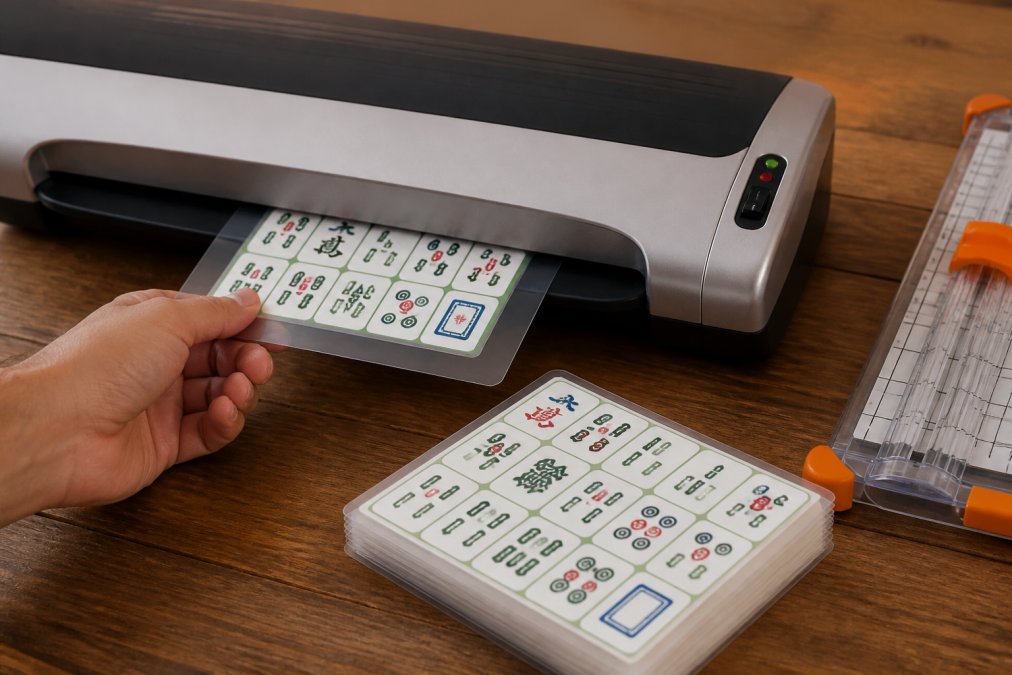
Here's the process:
- Let printed ink dry completely, about 10 minutes
- Slide the card into a laminating pouch
- Feed the pouch through the laminator
- Trim the sealed edges with a paper trimmer
Where to Find Printable Mahjong Score Sheets Free
Free printable mahjong score sheets are easy to find online. Search for "printable mahjong score sheets free" and you'll see dozens of options.
Look for sheets that include:
- A column for each player
- Rows for all four rounds
- Space for the winner's name
- A running total column
Common Printing Mistakes to Avoid
Most printing problems trace back to a handful of small errors:
- Printing at 100% scale, not "fit to page"
- Using copy paper instead of cardstock
- Skipping the test page
- Loading paper the wrong way for duplex jobs
- Printing before the ink dries
A Quick Reference for Your Next Print Job
Here's the whole process in one table:
| Step | What to Do | Time |
|---|---|---|
| Download | Save the PDF file | 2 minutes |
| Check | Confirm 300 DPI resolution | 1 minute |
| Set up | Choose Letter, 100% scale | 2 minutes |
| Test | Print one plain-paper page | 3 minutes |
| Run the full batch on cardstock | 10 minutes | |
| Laminate | Seal cards in 3 mil pouches | 5 minutes |
Keep this list handy. Once you've done it twice, the whole job takes under half an hour.
Frequently Asked Questions
Can I download a mahjong card for free?
You can find free printable mahjong score sheets and basic reference guides online, but official American Mahjong scoring cards are typically sold through the National Mah Jongg League. Free downloads often cover score tracking or simplified rule summaries rather than the official card. If you want themed greeting cards or party game bundles with Mahjong designs, those are usually paid digital downloads, though many cost under $5.
What paper weight is best for printing game cards?
For game cards and score sheets you plan to handle often, choose cardstock between 65 lb and 110 lb (176 to 300 gsm). A 65 lb cardstock works well for score sheets that stay flat on the table. For greeting cards or cards you will fold, 80 lb to 100 lb cardstock gives a sturdier feel. Anything lighter than 32 lb text weight will feel flimsy and may show ink bleed-through on double-sided prints.
How do I ensure my printed mahjong card is durable?
Print on quality cardstock, then laminate the card or slip it into a clear plastic sleeve. Laminating with a 3 mil to 5 mil pouch protects against spills, bending, and repeated handling during gameplay. If you use your score sheets weekly at club meetings, laminating lets you write on them with a dry-erase marker and wipe clean after each session. Store laminated cards flat to prevent curling.
Are there legal restrictions on printing mahjong cards?
Copyright rules apply to any digital file you download. When you buy a printable mahjong card or score sheet, the purchase usually covers personal use only. Printing copies to sell or distribute at a club event without permission may violate the seller's terms. Always check the listing for usage rights before you print multiple copies. Official National Mah Jongg League cards are copyrighted and should not be reproduced.
Printing your own American Mahjong cards and score sheets gives you full control over design, timing, and cost. The trick is matching your printer settings to your paper and testing before you commit. At AmericaMahjongfun.com, we make that easy with instant digital downloads, retro-inspired designs, and ready-to-print templates for every Mahjong occasion. Get started with AmericaMahjongfun.com and print a card your club will remember.